Plant Care
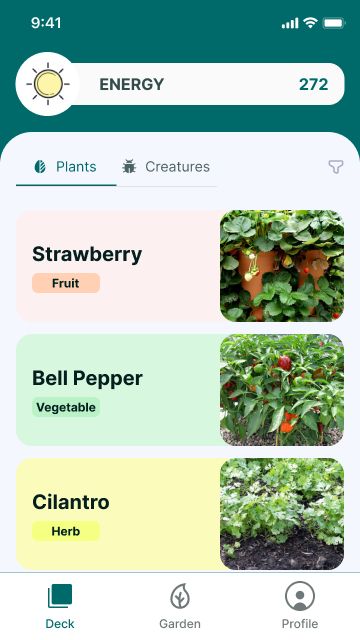
Plants are the real-world anchors of the WEFA loop. Players add plants from their environment, care for them daily, and earn energy to nurture their digital creatures.
Adding a Plant
A plant is added with:
- Photo (camera capture or upload) - required
- Nickname (player-chosen name)
- Species (verified or unverified)
- Location tag (where the plant lives)
- Notes (optional free text)
- Initial health (0-100, stubbed in V1)
The first photo timestamp is recorded for the plant profile.
Plant Detail
Tapping a plant opens a bottom sheet with two tabs:
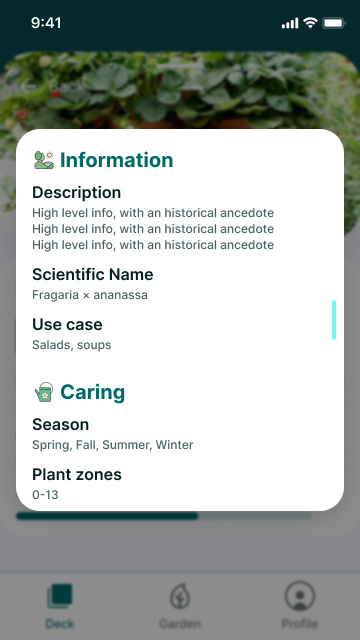
Info Tab
- Description with historical context
- Scientific name (e.g., Fragaria x ananassa)
- Use case (e.g., "Salads, soups")
- Season (Spring, Fall, Summer, Winter)
- Plant zones (e.g., 0-13)
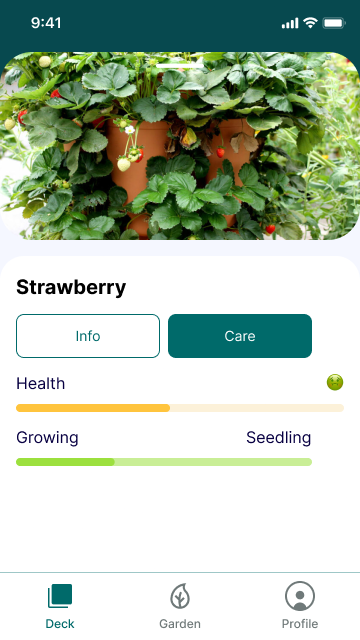
Care Tab
- Health bar (0-100)
- Growing stage label (Seedling, Sprout, etc.)
- Care action button
Daily Care
Care is driven by the plantCareMachine:
Photo Requirement
A daily photo is mandatory for each care event. This is the proof-of-care anchor that connects real-world action to digital reward.
Checklist Actions
- Watered
- Pruned
- Observed
- Cleaned
Streak System
Streaks track consecutive care days with soft decay:
- Missing 1 day reduces streak by 1 (no harsh reset)
- Streak bonus kicks in at 3+ consecutive days
Energy Rewards
| Action | Energy |
|---|---|
| Base care event | +4 |
| Streak bonus (3+ days) | +6 total |
Care events are queued locally via the job queue and can be attested (EAS) when online.
Filtering
Plants can be filtered by:
- Element (Fire, Water, Earth, Air)
- Health (healthy, fair, poor)
- Growth Level (Sprout, Seedling, Vegetating, Budding, Flowering, Rippening)

Key Files
src/views/Deck.tsx- Plant list and add-plant formsrc/hooks/plants/usePlantCare.ts- Care event logicsrc/hooks/plants/useAddPlant.ts- Add plant flowsrc/machines/plantCareMachine.ts- Care state machine