AR / WebXR
WEFA now treats AR as a product capability, not a separate render-mode picker. The app exposes two product experiences:
ARon devices with trueimmersive-arWebXR support.Garden Tabletopeverywhere else, using screen-space 3D when WebGL is available and falling back to 2D only when needed.
Platform Support
| Platform | Default experience | Notes |
|---|---|---|
| Android Chrome | AR | True immersive WebXR for gameplay and Garden AR activities |
| iPad / iPhone Safari | Garden Tabletop | No immersive WebXR requirement; live camera backdrop is optional, not the primary mode |
| Desktop browsers | Garden Tabletop | Secondary support path for non-mobile play and development |
| Low-capability devices | flat-2d | Emergency/accessibility fallback only |
AR in Garden
Garden AR is available through the activity views instead of a global renderer switch:
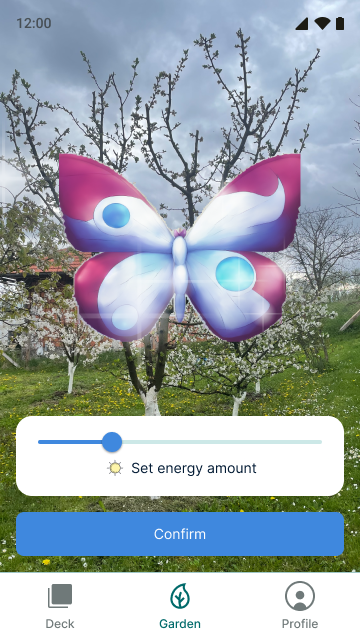
AR Nurture
Creature staging scene with nurture controls and an immersive AR entry on supported devices. On non-WebXR devices, this becomes the Garden Tabletop experience, with an optional live backdrop toggle.
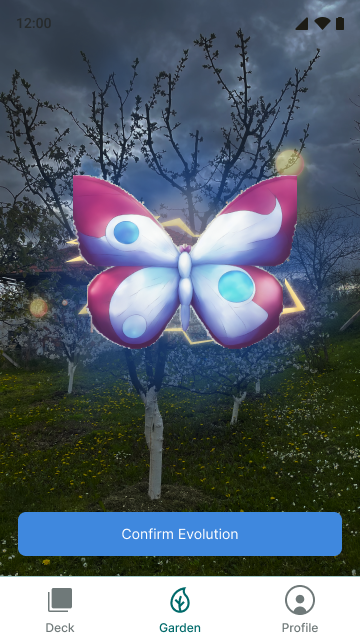
AR Evolution
Creature staging scene with evolution effects and an immersive AR entry on supported devices. On non-WebXR devices, this also becomes Garden Tabletop, with an optional live backdrop toggle.
AR in Games
The GameCanvas component now routes by ExperienceMode rather than exposing multiple product render modes:
GameCanvas
├── garden-tabletop
│   ├── <Canvas> with OrbitControls
│   └── Board + pieces rendered as the premium screen fallback, with optional live backdrop
│
├── immersive-ar
│   ├── Screen preview in the same scene host
│   ├── User-triggered XR session entry
│   ├── BoardPlacer (hit test → place on tap)
│   └── GameHUD in <XRDomOverlay>
│
└── flat-2d
    └── DOM board fallback
Garden activity views use the same product split:
TieredCanvas
├── garden-tabletop
│   └── Screen-space 3D stage
├── immersive-ar
    ├── <XR> session wrapper
│   └── In-activity "Open AR" entry
└── flat-2d
    └── Creature image fallback
XR Store
A shared XR store singleton configures the session:
createXRStore({
  screenInput: true,
  hand: false,
  controller: true,
  foveation: 1,
  frameRate: 'high',
  depthSensing: true,
  domOverlay: true,
});
Feature Detection
Feature detection resolves both a rendering tier and a product experience capability set:
experienceModecanEnterImmersiveARcameraBackdropAvailable
Camera backdrop support is no longer treated as its own product mode.
Key Files
src/components/game/GameCanvas.tsx- AR/non-AR canvas wrappersrc/components/game/BoardPlacer.tsx- AR surface detection and board placementsrc/components/game/BoardRenderer.tsx- 3D board meshessrc/components/game/GamePiece.tsx- 3D/2D creature piecessrc/components/garden/TieredCanvas.tsx- Garden experience routersrc/components/game/GameHUD.tsx- Shared DOM and XR overlay HUDsrc/modules/xr-store.ts- Shared XR store singletonsrc/modules/validation-session.tsx- QA validation capture for AR/tabletop sessions
Validation
The repo-side validation workflow, QA build flag, and export path are documented in AR Validation Workflow.